Student Online Safety Software: A Complete Guide for New Zealand Schools
A practical guide to student online safety software in New Zealand schools, covering filtering, monitoring, wellbeing visibility, and privacy-first design.
 Bec May
Before we dive into the specific risks and regulations in the current digital environment in New Zealand schools, I'd like to clarify what we mean by 'student online safety software as it is used in this guide.
In schools globally, student online safety software refers to a group of systems designed to help protect students from online harm, identify emerging wellbeing risks, and support schools in meeting their duty of care. These tools typically sit alongside a school's network infrastructure and learning environment rather than replacing them, and most schools in New Zealand already use at least one of them, often without a real understanding of how they fit into a broader online safety ecosystem.
On a practical level, student online safety software may include technologies that block access to harmful or inappropriate content, monitor online behaviour for indicators of risk, generate alerts when concerning patterns emerge, allow students to report concerns safely and confidentially, and record and track how well-being concerns are managed over time.
Understanding how these layers work in tandem ensures schools can build a comprehensive and sustainable approach to online safety.
Core types of student online safety software used in schools
Software Type | What it does | Core purpose in schools |
|---|---|---|
Web filters and firewalls | Blocks or restricts access to categories of inappropriate or harmful content | Reduces exposure to known risks and supports age-appropriate access |
Activity monitoring, reporting, and alerting | Monitors student online activity to detect online risks and generate alerts and reports. | Identify at-risk students early and support timely well-being and pastoral intervention. |
Student reporting tools | Allows students to confidentially report concerns to trusted staff members | Encourages help-seeking and supports student voice |
Digital safety case management and recording systems | Records, tracks, and manages how student well-being concerns are handled over time, including actions taken, outcomes, and staff involvement | Ensures concerns are documented consistently, supports accountability, and demonstrates compliance with well-being obligations |
From online safety solutions to real student wellbeing outcomes
Many discussions about online safety get stuck on individual products, new features, or flashy integrations. While these details matter, a more important question for school leaders is: What outcome are you trying to achieve?
For most schools, those outcomes include:
- Reducing student exposure to harmful content
- Identifying students who may be struggling before a situation escalates
- Ensuring concerns are surfaced without overwhelming classroom teachers
- Making informed, data-driven decisions about firewall and network policies
And most New Zealand schools are aiming to achieve all of them. That is why a single product or control cannot deliver student online safety. It requires a layered approach that combines infrastructure, visibility, clear reporting, and human-led response in a way that is cost-effective and adds minimal technical overhead.
In practice, this means understanding how these platforms work together and who is responsible for operating these systems and their outputs. It also means selecting technology that reduces staff's operational burden, rather than shifting responsibility or creating new layers of work.
With this foundation in place, we can now look at how New Zealand schools are operating today, and why visibility has become such a critical missing piece.
Keeping students safe online: Why visibility matters
Imagine, for a moment, a Year 8 student named Ella who attends a typical secondary school. As part of an in-class research task on a recent political event, Ella clicks on a website that unexpectedly contains a graphic, violent video of the event. A clip that had slipped through the school's web filtering system. Disturbed and unsure what to do, Ella doesn't report the incident, hoping she can forget about it.
But that night, when she lies down to sleep, the violent images flood back into her mind. She struggles to sleep. The next day, while waiting for the bus, a man unexpectedly walks up behind her, and Ella jumps in fright, her heart racing. She isn’t sure why she’s so on edge, but the disturbing images have put her in a constant state of anxiety. The following days are no better; she remains jumpy, sleeps poorly, and, before long, her grades suffer as a result. This scenario may sound extreme, but it illustrates a very real problem.
This kind of incident is more common than you might think. Research by Netsafe found that 1 in 4 New Zealand children (aged 9 to 17) were upset by something they encountered online in the past year, even with typical school firewalls and filtering in place. In the same survey, 36% of teenagers reported being exposed to violent or gory online content– much like the video Ella saw. Exposure to such graphic material can be traumatic for young people; studies have linked violent media exposure to issues like anxiety, sleep disturbances, or even PTSD like symptoms in some children. In Ella's case, the school's filtering system did not prevent her from seeing the harmful content, nor did it alert anyone that she was experiencing something disturbing and might need some support.
A holistic approach to online safety is needed
Global leaders in student safety are increasingly acknowledging that "filtering alone is no longer enough to safeguard and support children's online experiences in the long run". Even very stringent measures (think aggressive filters or outright device bans) can fall short of addressing the full spectrum of online issues students face. In the past, when we talked about digital safety, schools often focused solely on blocking harmful content and limiting screen time. But digital well-being today means more than just avoiding the bad – it refers to a balanced use of technology that actively supports and enhances students' emotional, social, and cognitive well-being without causing harm.
Protecting students like Ella requires a holistic, multi-layered approach to digital well-being. Content filters remain a vital first line of defence, but they require support: comprehensive digital citizenship education, monitoring and reporting mechanisms, and a strong wellbeing framework to back it all up. This means teaching students about digital safety and resilience, engaging parents and caregivers as partners, and using technology to detect and respond to potential issues in real time. This approach recognises that ensuring digital well-being is not just about keeping the bad stuff out but also about empowering children to navigate the digital world with confidence.
IT in New Zealand schools: A changing landscape
New Zealand schools are better protected at the network layer than ever before.
Network protections and national infrastructure
Network for Learning has already migrated more than 500 schools onto its new Managed Network, complete with next-generation firewalls, with the remaining 2000 scheduled to follow by mid 2026. Once complete, every state and state-integrated at school will be connected via high-speed fibre or satellite data, with N4L managing services directly for the first time.
From a security and reliability perspective, this is a major step forward. Next-generation firewalls and centralised filtering provide schools with stronger baseline protections, faster configuration changes, and nationally consistent controls.
The limitations of internet filtering
While schools have greater control over which categories are blocked, filtering provides little to no insight into how students are actually interacting with the internet. Blocking content on an allowed platform, such as Google search or YouTube, remains difficult, and responsibility for interpreting risk ultimately rests with the school itself.
In a recent experiment, online harm researchers were able to access pornography, sexualised animal content, and self-harm information on school-issued iPads at multiple primary schools, despite filtering tools being in place. One researcher noted that many teachers assumed current systems fully protected students, when in reality they did not. The president of the Secondary Principals’ Association of New Zealand reinforced this concern, stating that while access to inappropriate material online is not new, it is becoming “significantly harder” to prevent.
The operational reality for schools
At the same time, teachers and principals are already stretched. Expecting classroom staff to constantly monitor what is happening on every student’s screen is unrealistic. Shoulder-surfing does not scale, and it is not a sustainable online safety strategy.
Bridging the visibility gap
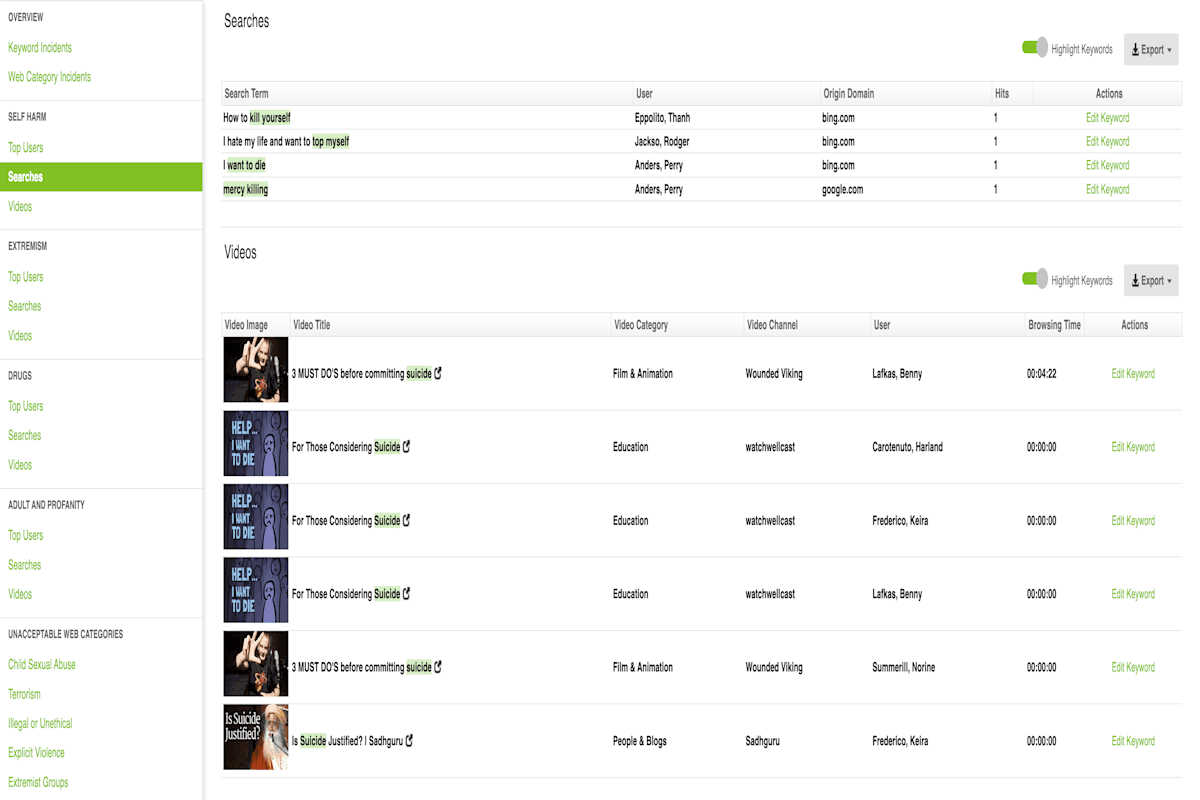
This is where visibility becomes critical. Modern firewalls already collect all the logs needed to understand online behaviour: The challenge is not the absence of data, but a lack of context and clarity. Fastvue Reporter for Education taps into this data and turnsit into clear, real-time reports and alerts that show what students are actually seeing on the school network.
Instead of raw logs, only system admins can make heads or tails of, schools get human-readable, student-level timelines that highlight repeated behaviour, emerging patterns, and potential escalation. Noise from background web traffic is removed so staff see meaningful activity, not technical clutter or red herrings. Reports answer practical questions quickly and clearly, such as which student was involved, what happened, how often it occurred, and whether it was a one-off or a trend.
New Zealand Legal and Wellbeing Requirements
Privacy Act 2020
Under the Privacy Act, Schools are required to handle personal information lawfully and transparently. If your school monitors students' online activity (e.g., on school Wi-Fi or devices), you must:
- Inform students and families that monitoring is in place, what’s being collected, and for what purpose (Privacy Principle 3).
- Ensure that all data is kept secure, is only used for its original purpose, and is not shared unless permitted (Privacy Principle 5)
- Appoint a Privacy Officer to oversee compliance.
Fastvue processes all data on your school’s infrastructure, ensuring no student data is exposed to third-party apps or offshore processors, helping you meet these obligations confidently. We also provide schools with a range of templates that help communicate your Fastvue Reporter AUP.
Harmful Digital Communications Act 2015
NZ Schools are legally required to take reasonable steps to prevent and respond to online abuse, including:
- Teaching digital citizenship and acceptable use
- Supporting students who report online harm
- Promptly removing harmful content from school-managed platforms
Netsafe is the approved agency for managing complaints under the act. Schools should work with Netsafe when incidents occur and educate students on how to report issues safely and legally.
Fastvue supports these responsibilities with real-time alerts, keyword monitoring, and investigation-ready reports that provide clear timelines, search intent, and behaviour patterns.
Ministry of Education & N4L Guidance
The Ministry of Education strongly advises schools to:
- Use N4L’s safety and filtering service (fully funded) or ensure your solution aligns with N4L’s filtering categories
- Actively monitor network activity
- Embed digital wellbeing and online safety into school culture
Note: Some online safety software platforms include their own built-in filtering engines. These often use commercial keyword databases or content categorisation that don’t match N4L’s category definitions, leading to inconsistency and poor alignment with NZ guidance.
Fastvue Reporter: A different kind of online safety software
Fastvue Reporter for Education is not a filter, and it is not a replacement for your existing firewall or N4L services.
It is the firewall visibility layer that turns technical network data into information schools can actually use.
Firewalls already record everything that happens on the network. Every search, every site visit, every blocked request is logged. What firewalls (and often their native reporting) don't do well is make that information usable for non-IT staff. Logs are technical, noisy, and designed for troubleshooting infrastructure, not supporting student well-being.
Fastvue takes existing firewall data and presents it in a way that makes sense to people responsible for students. It shows what was searched or viewed, how often it occurred, how long the content was visible, and whether the behaviour is changing or escalating over time. Crucially, this information is tied to a real student identity, not an IP address or device name. It’s the difference between seeing that Ella landed on YouTube and knowing that she watched a violent video on YouTube for 3 minutes and 15 seconds, which included the timestamp where the violence was shown on screen.
For teachers and well-being staff, this removes the impossible expectation of constant screen monitoring or guessing what happened after an incident is reported. Instead of relying on anecdotal observations, staff have timely evidence-based insight into what is actually happening online.
Because Fastvue builds on the systems schools are already using and plugs into existing firewall categories, it keeps technical overhead low. There is no second filtering engine to manage, no competing categorisation logic, and no duplication of network controls. Instead, Fastvue focuses on clarity. It reduces noise, cuts down false positives, and allows staff to focus on support and decision-making rather than investigation.
Fastvue delivers four strengths that distinguish it from traditional monitoring or classroom-based tools:
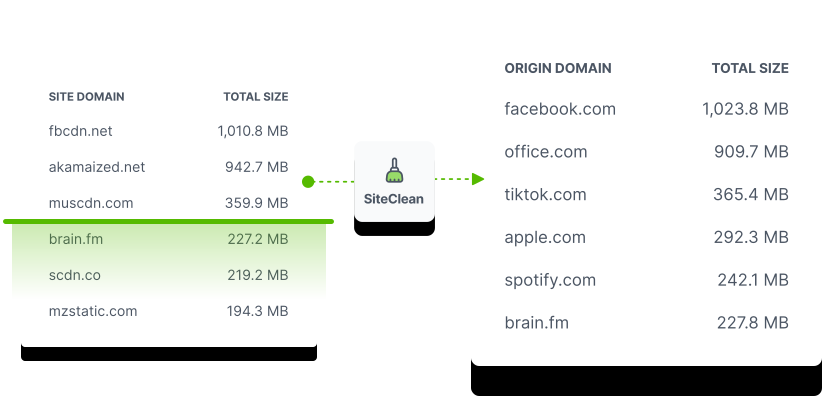
- Noise-reduced reporting that strips away background web traffic so staff see what students actually viewed or searched for using Fastvue’s own Site Clean Technology
- Cybersafe-focused visibility that highlights patterns, repetition, and escalation rather than isolated events
- Whole-network coverage across devices, users, and locations on the school network, including BYOD
- Privacy-first deployment that keeps all student data on school-controlled infrastructure
These strengths become more evident when we look at how we address keyword monitoring and safeguarding alerts.
Why context matters in keyword-based monitoring
On paper, keyword monitoring can appear straightforward. Some systems rely on isolated word matching or AI models to flag risk and alert staff. It is this lack of context, rather than keyword monitoring itself, that can create operational and ethical challenges for schools.
Investigations into automated student monitoring systems have shown that machine-learning-based tools frequently misclassify benign or ambiguous activity as high risk, and miss genuine harm if risk is not immediately obvious. In one documented case, a 13-year-old student in the US was arrested, interrogated, strip-searched, and spent the night in a jail cell after an automated system incorrectly flagged a misguided, but harmless online comment as a threat. The escalation was based on the software's misinterpretation, not the actual intent.
Further analysis by the Electronic Frontier Foundation found that automated monitoring tools often flag (and, in some cases, delete) legitimate student work, such as creative writing, research queries, or searches for mental health support, as high-risk.
At the same time, genuinely concerning behaviour can be missed because it unfolds gradually rather than in a single dramatic search. Both outcomes carry safeguarding risk. One delays intervention when a student needs help. The other undermines trust between students and staff by unnecessarily escalating issues.
The core issue is not whether keywords matter. They do. The issue is how they are interpreted.
Why 'everything-alerting AI' fails in schools
Many education technology providers working in the digital wellness space lean heavily on automated sentiment analysis or black-box AI models to surface risk. These systems trigger alerts based on the presence of sensitive words and phrases, with limited visibility into how context was assessed or why aparticluar conclusion was reached.
This creates two immediate problems.
Firstly, many moderated monitoring systems remove human judgment from the early stages of response. Alerts are generated and escalated before staff understand what actually triggered them. In some documented cases, alerts have been passed to senior leadership or even law enforcement without meaningful review, based on a single phrase about algorithmic risks, rather than context. This lack of human moderation increases the risk of inappropriate escalation (which may create wellbeing issues in its own right) and undermines trust between students and schools.
Secondly, false positives and over-alerting become inevitable. A single keyword being searched for a health lesson or classroom assignment can generate dozens of alerts. Without surrounding context, 'Best way to shoot myself in a selfie' quickly becomes misclassified as a self-harm risk rather than a harmful search for photography techniques. Over time, this leads to alert fatigue. Staff stop trusting the system, or worse, start ignoring alerts altogether.
While these systems are effective at handling large volumes, research and regulatory guidance consistently indicate that they are not yet sufficiently reliable to operate without human verification. Automated systems can assist in identifying signals of concern, but they struggle with context, intent, and ambiguity, particularly when behaviour unfolds gradually rather than through a single explicit incident.
Fastvue’s approach: precision keyword matching
Fastvue does not use sentiment analysis to guess student intent or emotional state. Instead, it provides contextual visibility into online behaviour patterns, allowing schools to apply human judgement rather than automated interpretation.
Keyword monitoring in Fastvue Reporter is designed to support student well-being and safety decisions, rather than replace them. It focuses on explainability, pattern recognition, and false-positive reduction so staff can understand why something surfaced before deciding what to do next.
In practice, this is achieved through a combination of deliberate design choices.
Fastvue Reporter applies keywords in context with:
- Whole-word matching where it matters: Fastvue allows keywords to be matched as whole words rather than partial strings. This prevents false positives such as “THC” triggering on “healthcare”, or “bomb” triggering on “Bombay”. Where appropriate, partial matching can still be used intentionally, for example, matching “pornograph” to cover multiple variations.
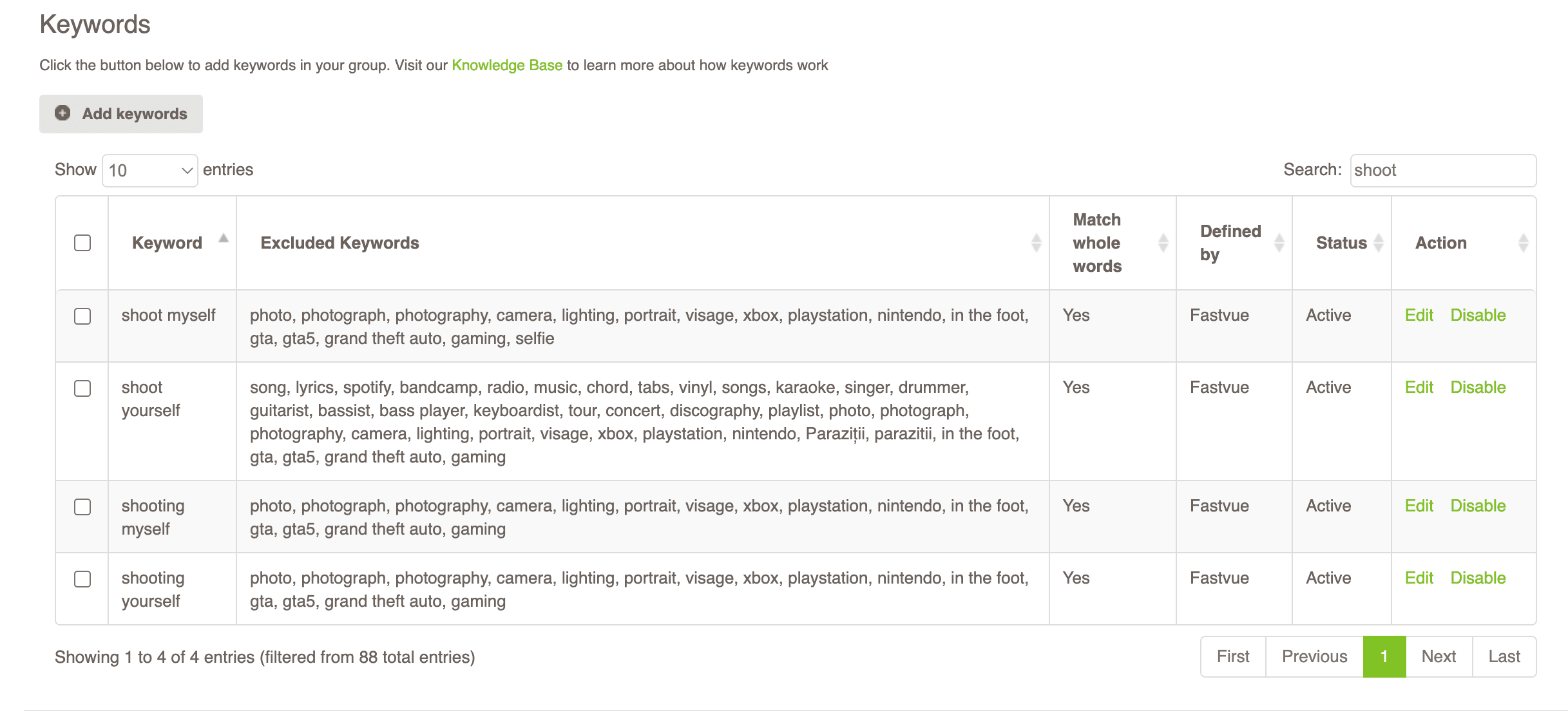
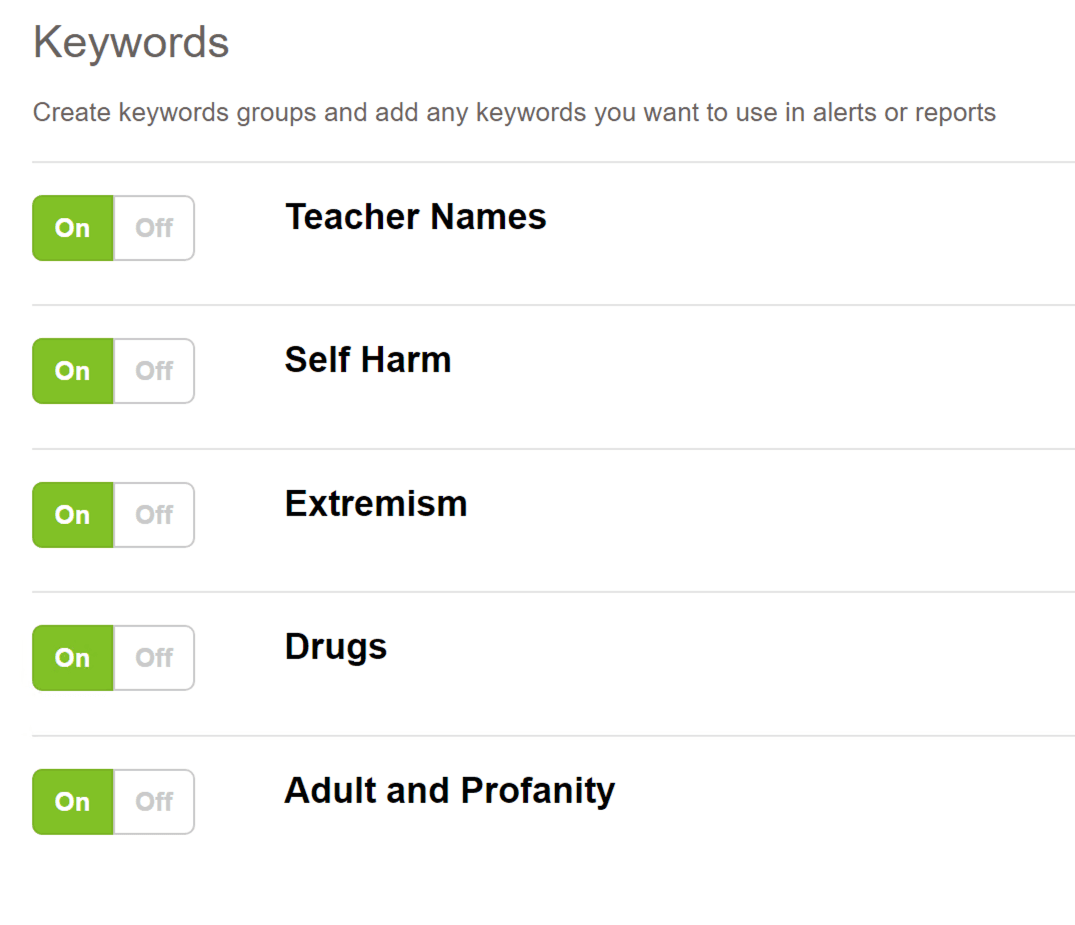
- Curated keyword groups with built-in exclusions: Default keyword groups such as Self-Harm, Extremism, Drugs, and Adult and Profanity are maintained by Fastvue and continuously updated. These groups include both keywords and exclusions, reducing alerts from curriculum content, common phrases, or benign research activity. Schools are able to edit, disable, and create their own keyword groups to suit their environment.
- Pattern and escalation awareness: Fastvue does not treat a single keyword in isolation as a well-being concern. Repetition, frequency, and escalation over time are surfaced so staff can distinguish between curiosity, coursework, and emerging wellbeing concerns.
- Noise reduction before alerting: Background web traffic, advertising domains, and technical artefacts are stripped out using Site Clean. Keyword alerts are based on meaningful student activity, not incidental internet noise.
- Alerts without guesswork: Alerts do not attempt to interpret intent. They prompt staff to further investigate. By running a student user activity report, they can see what was searched or viewed, when it occurred, how often it repeated, and the surrounding context, so responses are based on evidence, not assumptions.
This is why Fastvue avoids the “everything-alerting AI” trap. It does not flag everything that might be risky. It surfaces what is worth human attention, with the granular data needed to respond appropriately.
Turning online safety insight into meaningful student support
As proud members of EdTechNZ, we understand the specific challenges New Zealand schools face when balancing online safety, student wellbeing, privacy, and operational realities.
Fastvue is not about adding another system or another burden. It is about working with what schools already have, aligning with the Ministry of Education and N4L guidance, and helping teams turn network data into clear, usable insights that support pastoral care and informed decision-making.
We see ourselves as a long-term partner, not just a software provider. That means supporting IT leaders, wellbeing teams, and school leadership in building practical, proportionate, and sustainable online safety practices in real school environments.
If you’re ready to move beyond filtering alone and build a clearer, more human-led approach to student online safety, our ANZ team can help you get started.