Is Roblox Safe for Kids? What Parents and Schools Need to Know
Is Roblox safe for kids? Learn the key risks for parents and schools, including chat, private servers, condo games, predators, Robux spending, and risky Roblox searches.
 Bec May
Just when you think you've got a grasp on what your child is doing on Roblox, they move to a different part of the platform, and they're out of reach again. That's what makes Roblox so hard to assess. It isn't one game. It's hundreds of them, running inside a single app, with very different risk levels depending on where your child happens to be today.
Over the last year in particular, Roblox has faced growing scrutiny across the globe for how well it protects children from harm.
In Australia, the eSafety Commissioner put Roblox on notice over concerns about child grooming and harmful material, then issued legally enforceable transparency notices requiring the platform to explain how it is addressing risks, including grooming, cyberbullying, online hate, and radicalization. In the UK, Roblox has been swept up in wider regulatory pressure on child-facing platforms, with Ofcom calling for stronger age checks and tougher protections against grooming. A recent criminal case also saw a 19-year-old man jailed after grooming a 14-year-old girl he met on Roblox.
In the US, Roblox has faced state investigations and been required to pay multimillion-dollar settlements over allegations it failed to protect children from sexual predators, grooming, and harmful content.
In response to growing pressure, Roblox has implemented stronger parental controls, age-based account settings, content maturity labels, and tighter communication defaults for younger users. While these are clear signs that Roblox recognizes the scale of the issue, they don’t make the platform risk-free. Yes, Roblox is engaging, social, creative, and for many young people, a normal part of everyday life. However, the same features that make the platform appealing can also create real safety risks. So perhaps the questions parents and schools need to ask are not ‘Is Roblox safe for kids or not?’, but rather ‘How does Roblox work?’ ‘What and where are the risks within the game? and ‘What should I be on the lookout for when my child/student is playing Roblox games?’
What is Roblox, really?
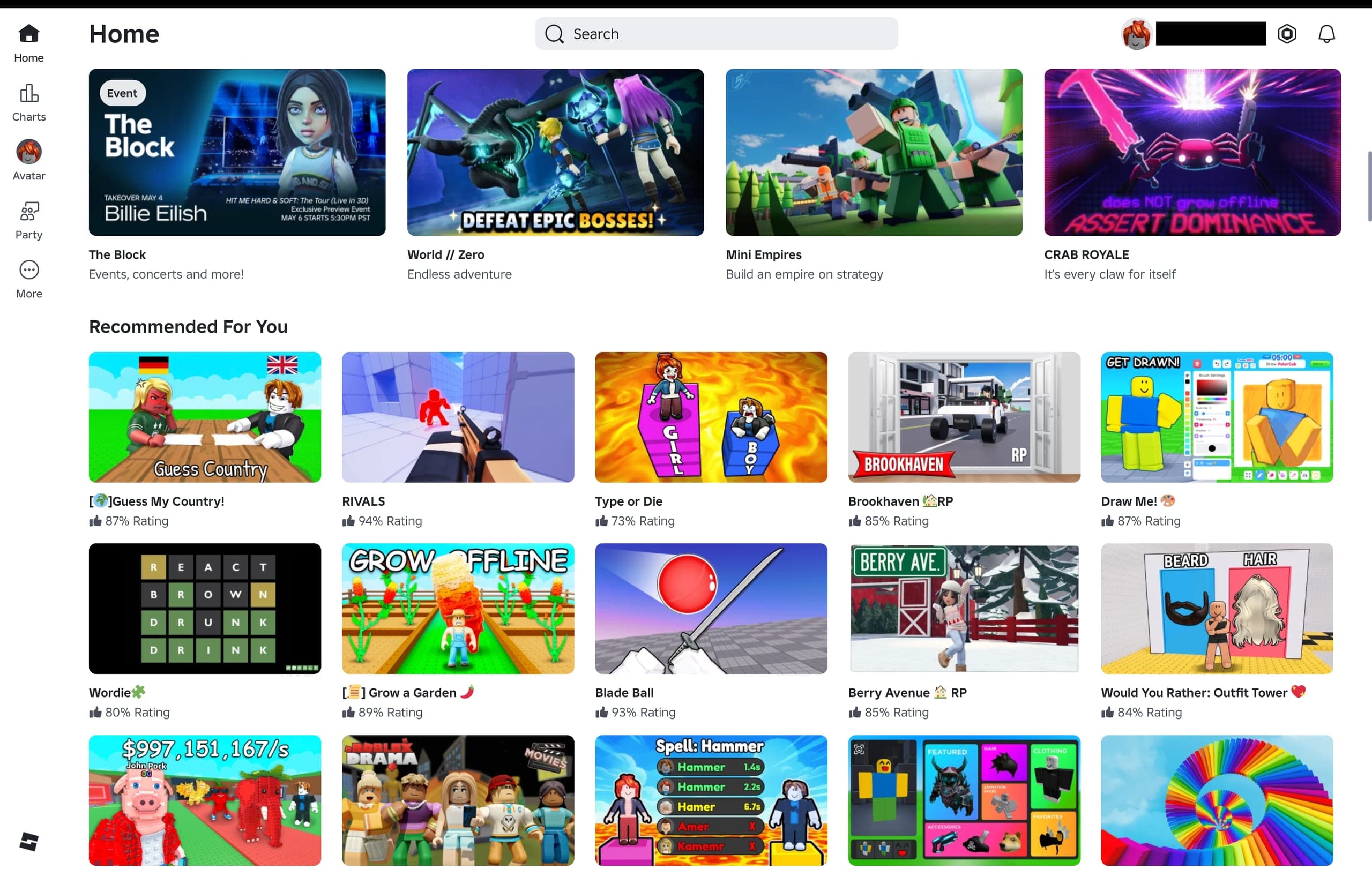
One of the main reasons it’s hard to work out whether Roblox is safe is that it is not simply one game. It’s a vast, user-generated platform where people can play games, build their own experiences, join social hangouts, communicate with others through text or voice chat, and spend money through in-game purchases. Roblox itself describes the platform as a place where people can “play, create, and connect,” with millions of user-made experiences to explore. It’s bright, colorful, and has LEGO-style visual appeal.
For young people, that makes Roblox feel (and sound) creative, social, and endlessly entertaining. I’m pretty sure it was around week two of my daughter’s first year of school when she came home asking if she could play it. I won’t tell you how I responded, as every family and every school community will make its own call. My point here is that the platform is so widely embedded in children’s lives that avoiding the conversation is not really an option.
For parents and schools trying to get a grip on the risk picture, this is where things start to get slippery. “My child/student is playing Roblox” does not actually tell you much. Where one child may be building harmless obstacle courses or visiting simple adventure games, another may be spending time in loosely moderated roleplay rooms, social hangouts, or chat-heavy spaces with older Roblox users: same platform, very different risk landscape.
At a basic level, Roblox works like this: users create an account, choose an avatar they can customize over time, then browse and join different user-made experiences. These online games fall into a few broad types:
- Obstacle and adventure games: Fast-moving challenge games built around jumping, timing, and completing stages. Think Mario Bros, just bigger, faster, and a lot more chaotic. Example: Tower of Hell
- Roleplay games: Lands of digital make-believe, where children act out everyday life, school, family, or fantasy scenarios. Example: Brookhaven RP
- Tycoon and simulator games: Similar to Sim City or RollerCoaster Tycoon, the goal is to build, earn, upgrade, collect, and grow. Example: Pet Simulator 99
- Creative and building experiences: Closest to digital Lego, where players build houses, towns, or whole worlds. Example: Welcome to Bloxburg
- Racing, sports, and action games: More traditional video game territory, built around speed, competition, or combat. Example: Jailbreak
- Social hangouts: Less like a game and more like a virtual shopping center or skate park, where the main point is hanging around and talking.
Example: Club Iris
Age groups, age ratings, and why a child’s age changes the risk in Roblox Games
A big part of answering whether the Roblox platform is safe for kids comes down to age.
But here’s where it gets tricky: it’s not just the child’s actual age. It’s the user’s age on the account (which can be pretty easily faked), the features that age unlocks, the kinds of experiences the child is mature enough to handle, and, more importantly, the education they’ve received around how to use the platform safely.
Roblox’s April 2026 update introduced two new age-based account types for younger users: Roblox Kids for ages 5 to 8, and Roblox Select for 9 to 15-year-olds. Roblox Kids’ accounts are limited to selected ‘experiences’ with the maturity rating of Minimal or Mild, with online communication turned off by default. Roblox Select accounts give 9- to 15-year-olds access to a wider, still-filtered part of Roblox. Chat is not automatically wide open, but it is also not locked down in the same way as kids’ accounts. What a child can access and who they can talk to depends on their age check and settings.
Age restrictions and age verification in Roblox Studio
Since December 2025, Roblox users have been required to complete an age verification check to access chat features. It’s part of a broader, much-needed move to tighten the platform’s safety settings, but one that seemed to arrive only after mounting pressure and increasingly critical headlines.
Roblox says its age checks use facial age estimation to help separate children from adults in their chat function. But that process is not especially complex or rigorous. When I tested it, it was basically “turn your camera on, turn left, turn right”, after which the system estimated an age band. That may be better than relying on whatever birth date a child types in, but it is not hard to see the weak points. A child using an older sibling, cousin, or parent during the scan could potentially be placed in an older age bracket. Roblox appears to know this, too. For parents, the key point is simple: do not assume the account age is accurate just because the child says it is.
Roblox’s newer controls only work properly if the user's age on the account is correct. That means parents should check it manually, link their own account where possible, and review which features are available. A child on the wrong birthday setting can end up with very different content access and communication options than intended. Recent reporting has also highlighted that some parents have helped children bypass age checks, which rather defeats the point.
I’m guessing the parents doing this have not seen, heard, or read some of the cases involving predators and Roblox, or, if they have, have badly underestimated how quickly a child can end up in spaces and conversations that can easily manipulate children to move off platform.
Which types of Roblox experiences should you be paying attention to?
Parents and schools don’t need to panic about each and every Roblox game. The ones that deserve a closer look are usually the experiences where the “game” is not really the game at all. It is the talking, hanging around, roleplaying, trading, gifting, joining private servers, or moving between users.
This is usually where the risk picture changes significantly.
Here are the Roblox games and experiences we recommend paying closest attention to:
1. Social Hangouts
These are the experiences that look less like games and more like virtual shopping centers, skate parks, nightclubs, houses, beaches, or town squares. The main activity is not gaming. No one is completing a level or winning a competition. The main activity is hanging out with other Roblox users.
Examples parents and teachers may hear about include Club Iris, Plaza Connect, Rate My Avatar, and other “hangout” style games where players stand around, chat, use emotes, compare avatars, join groups, or move into smaller areas of the map.
A social hangout is not automatically a problem. If a child is hanging out in a Roblox experience with school friends, cousins, siblings, or other friends they know in real life, the risk is very different from joining a public hangout full of unknown Roblox users.
If the main activity is open-ended socializing with no real point, then the safety question becomes: who is my child talking to, what are they talking about, and will that conversation move into private chat, voice chat, Discord, Snapchat, or another app?
2. Roleplay games
Roleplay games or RPGs have been hugely popular with young kids for decades- players move into a world of digital make-believe, where they can be, say, and do whatever the game allows. This can actually be really beneficial for kids- they get to try on different roles, make choices, test boundaries, and explore parts of themselves in a lower-risk environment without real-world consequences.
Many children use these games innocently. The issue is that roleplay can blur boundaries very quickly. A game about families, schools, houses, dating, sleepovers, or “adoption” can create situations where children are encouraged to act out relationships with people they do not know. That may be harmless pretend play between friends, or it may create space for inappropriate questions, grooming behavior, pressure, gifts, or sexualized roleplay.
Common examples include Brookhaven RP, Adopt Me!, Livetopia, Berry Avenue, and Twilight Daycare.
Parents should pay attention if a child talks about having a “Roblox boyfriend/girlfriend”, being “adopted” by older players, joining houses or bedrooms with strangers, receiving Robux or gifts, or being asked to continue the roleplay somewhere else.
3. Games with private servers or closed groups
Private servers (previously VIP servers) are just what they sound like. A user-owned, subscription-based server configured for a specific game that gives the owner control over which users can join. These can actually be useful for a child playing with real-life friends and family members, as they keep them separated from the wider Roblox user base. However, private doesn’t necessarily mean safe. Private can also mean less visible.
A child may be invited into a private server by someone they only know online. Once inside, the group can feel more exclusive and trusted. That is exactly the sort of environment where children may be more willing to share personal information, accept gifts, follow instructions, or move the conversation off platform.
Roblox parental controls now allow linked parents to review private servers, manage connections, set content restrictions, manage spending limits, and control communication settings. But those tools only help if the parent has actually linked their account and checked the child’s settings.
A practical parent question here is: “Do you know everyone in that server in real life?”
If the answer is no, that is not necessarily a disaster. But it should trigger a closer look. You can change which private servers your child can access or restrict access altogether in Settings > Privacy & content restrictions > Private servers.
4. Experiences with in-game chat, voice chat, or party voice chat features
When it comes to Roblox and child safety concerns(particularly stranger danger), the in-game chat features often matter more than the nature of the game itself.
Roblox includes several chat features:
- Text chat
- Experience chat
- Direct chat and
- Voice features
As I mentioned earlier, Roblox players cannot enable chat until they complete an age check, and underage users need parental consent to use certain chat features. Users aged 5 to 9 require parental consent to enable experience chat, and users under 13 require parental consent to enable direct chat (which are both turned off by default).
To check these settings is relatively simple.
Open the child’s Roblox account, go to the account Settings >
Privacy & content restrictions >Communication to see which communication features are enabled.
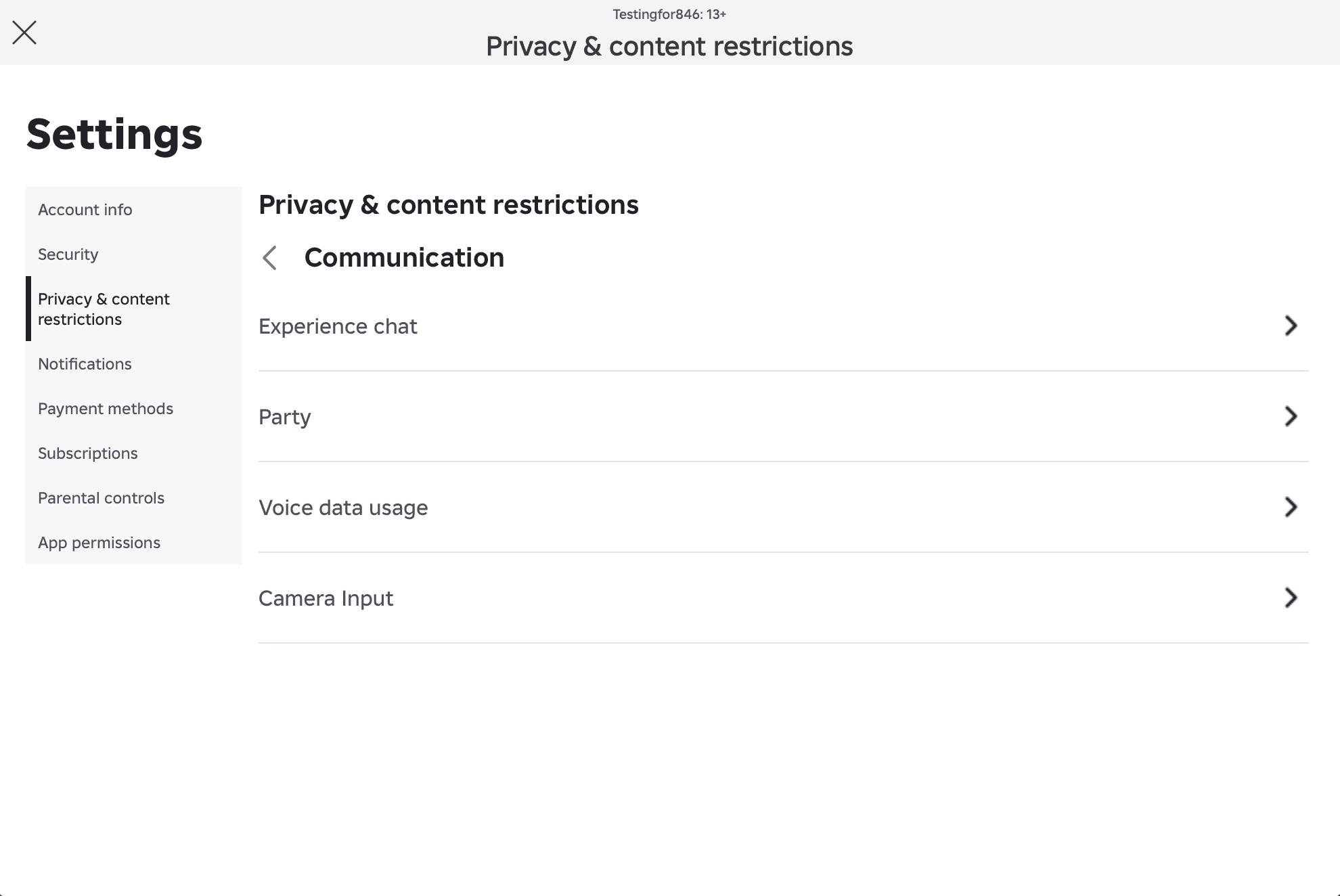
Can they use experience chat? Direct chat? Voice chat? Party voice? Can they receive messages from friends, connections, or wider Roblox users?
Our recommendation for most parents is that younger kids should have chat disabled altogether. For teenagers, the conversation needs to shift from what is bad to age-appropriate conversations about what manipulation, pressure, secrecy, and stranger danger look like in an online game.
5. “Condo” games and sexualized copies
Wondering what the heck condo games and sexualized copies are? You’re not alone. For many parents and schools, they don’t hear these terms until something has already gone wrong.
“Condo games” is a term often used for user-generated Roblox experiences that contain sexual content or sexualized roleplay. They are usually short-lived, copied, renamed, removed, and reuploaded. This makes them hard for moderation systems and parents to keep up with.
According to the BBC, “much of what is written on chats in condos is unprintable on a grown-up news website, let alone a children’s game.”
And let’s be real, kids aren’t searching for obvious keywords like “inappropriate Roblox game”. They’re typing in slang words, codes, invite links, Discord groups, or game names being passed around by other players and their mates.
That is why the schools we work with often build Roblox-specific keyword groups around terms like:
“Roblox condo”
“Roblox condo Discord”
“Roblox 18+”
“Roblox sus games”
“Roblox private server link”
“Roblox bypassed games.”
“Roblox unblocked”
“Roblox voice chat without ID”
This is where visibility into firewalls and web filtering becomes useful. Schools may not be able see everything that happens inside the Roblox app. Still, Roblox-related searches, proxy attempts, Discord movement, and repeated attempts to access blocked content can give safeguarding teams a much clearer starting point.
6. Horror, violence, and “mature” experiences
Some Roblox games are designed to be scary, intense, or violent. Examples parents may hear about include DOORS, The Mimic, Rainbow Friends, Piggy, and Murder Mystery 2.
Plenty of children enjoy the mild scares, chase games, monsters, and cartoonish suspense of these games. The issue is whether the content matches the child’s age, maturity, and sleep patterns.
Roblox’s content maturity labels may include descriptors such as fear, violence, light realistic blood, repeated mild violence, heavy unrealistic blood, or heavy realistic blood. Parents should check the content maturity label before saying yes, especially for young kids who may be technically able to access a game but not emotionally ready for it.
A practical test: if a child is having nightmares, becoming anxious, hiding what they are playing, or playing late at night on a bedroom device, the issue may not be Roblox overall. It may be that the specific Roblox games they are choosing are not right for that child at that time.
7. Trading, collecting, pets, skins, and Robux-heavy games
Not all Roblox risks involve inappropriate content or stranger danger. For many parents, the first problem they encounter with their kids’ use of Roblox is money spent on in-game purchases. Plenty have learned the hard way that saving a card, linking PayPal, or enabling fingerprint or face ID on a gaming device can end in a nasty shock when the bank statement arrives.
Roblox has its own virtual currency called Robux, which kids can spend on in-game purchases such as pets, outfits, skins, accessories, boosts, private servers, and game passes. Because no real cash is changing hands, it can feel like another element of make-believe, and kids can spend serious money without realizing it. And I’m talking about a stray $20 here or there. I’m talking serious cash. During the Australian Covid lockdown, a six-year-old boy racked up an $8,000 bill on the family iPad while playing Roblox after using his father’s fingerprint to unlock the device and approve purchases.
Parents should check:
- Whether a payment method is saved to the Roblox account, the app store, or the device
- Whether fingerprint ID, face ID, Apple Pay, Google Pay, or PayPal allows one-click purchases
- Whether app store restrictions or Ask to Buy are enabled
- Whether spending limits are switched on, and
- Whether the child understands that Robux is real money
8. Games that push children off the platform
This is the big one. Roblox exposes children to a range of risks, but by far the most serious concern for parents and schools is predatory behavior. Roblox is colorful, social, and built to feel fun and familiar to children. That is part of what makes it attractive. It is also what can make it attractive to adults who want access to children. Following a recent FBI undercover operation, the warning from prosecutors was blunt: “Instead of lurking on playgrounds, modern predators hide behind electronic devices using social media and texting apps to access young children.”
Roblox is not always where the worst harm happens, but it can be where the contact starts, where trust is built, and where a child is first drawn into a conversation they were never meant to be having. Roblox does not allow users to share images through chat, and Roblox says it has never allowed image sharing in chat (which is where many predators are heading when they start these conversations. In many cases, Roblox is less the final destination than the starting point, where contact begins before a child is pressured to move to a less visible platform or private messaging app.
For parents, the key phrases to listen for are:
- “Add me on Discord.”
- “What’s your Snap?”
- “Join my server.”
- “Don’t tell your parents.”
- “I’ll give you Robux.”
- “Send a photo.”
- “Let’s talk somewhere private.”
For schools, pay attention to internet usage patterns that show students moving from Roblox to Discord, WhatsApp, or other messaging platforms alongside searches such as the following:
- Roblox Discord
- Roblox vc no ID
- Roblox condo game
- How to chat privately on Roblox
- How to hide Discord messages
- What if someone asks me for pics
- How to know if someone online is lying about their age
- I hate myself
- How do I stop feeling ugly
- Someone is threatening me online
These are serious red flags and need further investigation by your wellbeing team.
Quick checklist: Is Roblox safe for this child, on this account, right now?
For parents grappling with the wild west that is Roblox, I’ve put together a quick checklist of questions I hope will be more helpful than “Is Roblox safe for kids ?”:
- Is your child’s account age accurate?
- Is your parent account linked?
- Is chat disabled or restricted for the child’s age?
- Is the content maturity level set appropriately?
- Are spending controls switched on?
- Are you looking into any private servers, Roblox friends, and direct messages your child is interacting with
- Does your child know not to move conversations off the platform?
- Do you allow your younger children to take their devices into private spaces, such as their rooms?
If the answer to most of these is no, then the issue is probably not Roblox in the abstract. It is that your child is using a complex, social platform without enough structure around it.
How schools can monitor Roblox-related searches
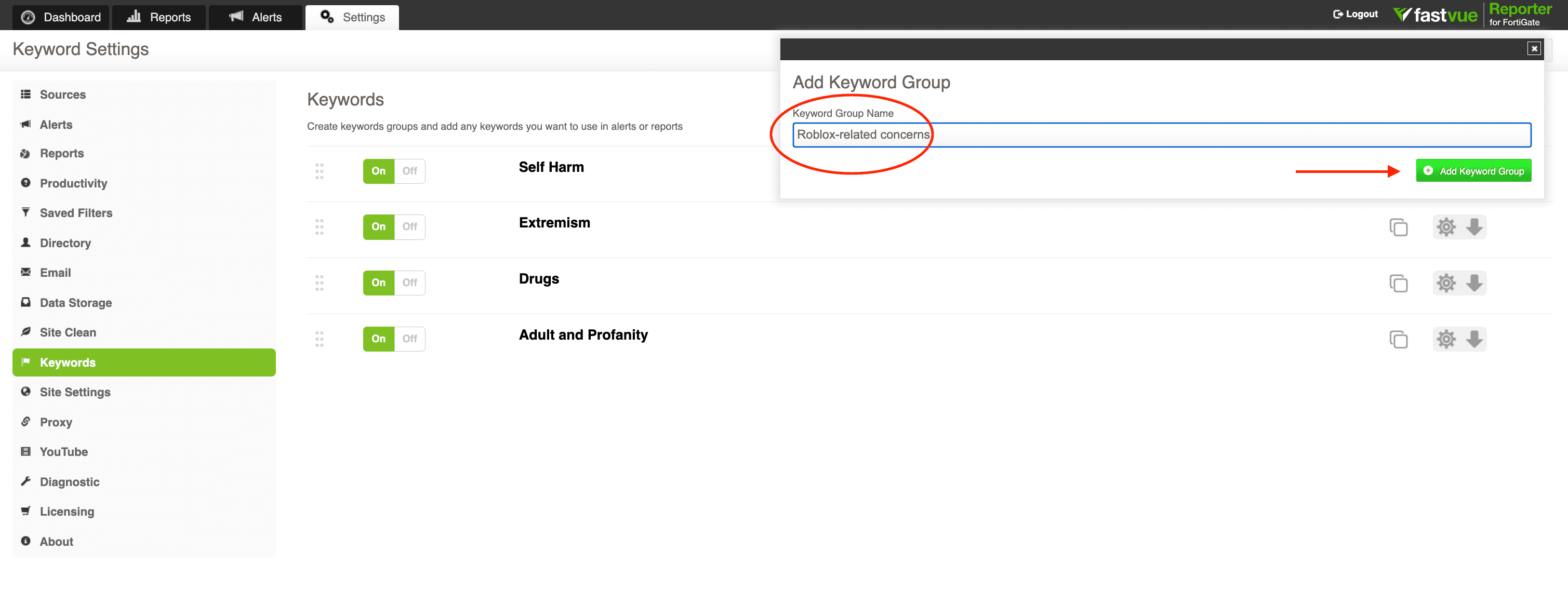
Fastvue Reporter can surface Roblox-related searches by adding Roblox terms to a custom keyword group. While we’d recommend creating a broader keyword group that covers the gamut of risky gaming platforms and behaviors, schools can begin with a small segment of Roblox-specific terms, such as ‘free Robux’, ‘Roblox Discord.’ ‘Roblox private server’, ' Roblox unblocked’, ‘Roblox condo’, ‘Roblox voice chat without ID’. Cutting and pasting the phrases from this article is a good place to start.
The aim isn’t to treat every Roblox hit as a safeguarding incident. It’s to help schools identify patterns that may suggest a student is trying to bypass filtering and safety features, access age-inappropriate games, or is at risk of engaging with scams or predators who are trying to move them off the platform.
For schools, teaching kids about the dangers of Roblox should sit within their wider digital citizenship and safeguarding conversations, not outside them.
For parents, it is another reminder that the best protection is not just about settings but about regular, age-appropriate conversations about online safety, stranger contact, and what to do if something feels wrong. The earlier those conversations happen, the more likely children are to speak up before a problem escalates.
Want to see whether students are searching for risky Roblox terms, private server links, Discord invites, or filtering bypasses? Fastvue Reporter for Education helps schools turn firewall data into clear, actionable safeguarding reports and real-time alerts for student online safety.