Internet Activity Reporting Software for UK Councils: A Procurement Guide
This procurement guide takes council decision-makers through what to ask suppliers, what to test using their own firewall logs, and how to compare data storage, retention, and access to reports.
 Bec May

From free public Wi-Fi to shared computers in libraries and community centres, UK councils help residents access essential online services, whether they're applying for a job, booking a GP appointment, completing schoolwork, or accessing government services.
However, providing public internet access comes with statutory responsibilities. Under the Counter-Terrorism and Security Act 2015, certain local authorities must have 'due regard to the need to prevent people from being drawn into terrorism’, with compliance overseen by the Home Office.
Furthermore, councils across Great Britain must comply with the UK GDPR and the Data Protection Act 2018, which limit what personal data can be collected, stored, and processed.
If a council collects internet activity data to manage network security, it must be able to justify the level of detail collected and how long those records are retained. Residents must also be informed about what personal data is collected and how it is used.
For local government IT leaders, this presents an immediate and practical challenge. How do you identify attempts to access illegal content, detect potentially concerning searches, investigate security threats, and respond to legitimate police requests without unnecessarily monitoring residents' private internet activity?
Councils need a way to understand how their public internet services are being used, fulfill their statutory safeguarding obligations, and comply with data protection legislation.
This guide is designed for council decision-makers and takes you through the key technical, regulatory, and procurement considerations when choosing internet activity reporting software for public networks.
Download the internet activity reporting software procurement checklist for UK councils
Establish your council's technical, reporting, safeguarding, and data protection requirements before issuing an Invitation to Tender (ITT) or Request for Quotation (RFQ).
What should UK councils look for in internet activity reporting software?
When evaluating internet activity reporting software, UK councils should look for platforms that integrate with existing network infrastructure, support statutory safeguarding responsibilities, provide appropriate data protection controls, and deliver clear reports and real-time alerts.
When evaluating software, local authorities should focus on eight key areas:
Evaluation criteria | Recommended capabilities |
Firewall compatibility | Integration with existing enterprise-grade firewalls |
Safeguarding | IWF Keyword List integration and configurable alerts for potentially harmful online activity |
Statutory responsibilities | Reporting capabilities that support the Prevent duty |
Data protection | Configurable data retention, restricted report access, and transparent data processing |
Deployment | On-premises or private cloud options for greater control over reporting data |
Network visibility | Reporting by site, subnet, device, and available user identifiers |
Incident investigation | Historical activity reports with accurate timestamps and relevant contextual information |
Value for money | Transparent licensing, scalability, and whole-life costs |
Fastvue Reporter is a dedicated internet activity reporting solution that works alongside supported enterprise-grade firewalls, enabling councils to address many of these requirements without replacing their existing filtering software.
1. Start with your existing network infrastructure
Before investing in a new internet monitoring or reporting platform, establish what your existing firewall can already do.
Many UK councils operate enterprise-grade firewalls to protect corporate networks, public internet services, and digital infrastructure distributed across multiple sites.
These firewalls can collect a large amount of useful data, including website activity, blocked connections, application usage, bandwidth consumption, and security events.
However, the native reporting tools available with your firewall may not provide the level of detail, accessibility, or safeguarding functionality your council requires.
For example, your network administrator might be comfortable searching through thousands of firewall log entries. Your library service manager or safeguarding lead probably isn't.
Dedicated internet activity reporting software bridges this gap by translating complex network data into readable reports and alerts.
Which firewalls support dedicated internet activity reporting with Fastvue Reporter?
Fastvue Reporter integrates with a range of enterprise network security platforms.
Vendor | Supported firewalls and network security platforms |
FortiGate (all FortiOS versions) and FortiSASE | |
Sophos Firewall (XG and XGS), Sophos UTM (SG), and Sophos Web Appliance | |
Next-Generation Firewalls (NGFW) | |
SonicWall firewalls and Secure Mobile Access (SMA) | |
Firebox (Fireware v12.0 and above) | |
Cisco | Cisco Firepower, Cisco Secure Firewall, Cisco Umbrella Secure Internet Gateway (SIG), and Cisco Secure Access |
CloudGen Firewall, NG Firewall, and Web Security Gateway | |
ContentKeeper web filtering and security platform |
The level of reporting detail available varies depending on the platform, firmware version, firewall logging, traffic inspection, and user authentication settings.
Check the compatibility of your specific firewall model, firmware version, and logging configuration before purchasing reporting software.
Reusing your existing infrastructure can reduce implementation costs, limit disruption to internet services, and allow your council to retain control over established filtering policies.
2. Evaluate how the software supports statutory safeguarding duties
Local authorities have statutory responsibilities to safeguard children and young people and prevent people from being drawn into terrorism. These responsibilities are relevant to the management of publicly accessible computers and internet services.
While filtering technologies help councils restrict access to illegal and harmful content, monitoring software provides visibility into potentially concerning online activity, including attempts to access restricted websites and searches that may indicate a safeguarding concern.
When evaluating internet activity reporting software, councils should consider how it complements their existing filtering controls and supports their wider safeguarding arrangements.
Two key considerations are the Prevent duty and the use of specialist intelligence from the Internet Watch Foundation (IWF).
Does the software support the Prevent duty?
Under Section 26 of the Counter-Terrorism and Security Act 2015, specified authorities must have due regard to the need to prevent people from being drawn into terrorism.
The Prevent duty guidance for England and Wales asks local authorities to consider filtering technologies for publicly available IT equipment to restrict access to material supporting terrorism or associated extremist ideologies.
Similar provisions appear in the Prevent duty guidance for Scotland.
The Home Office's Prevent duty toolkit for local authorities also recommends checking whether filtering providers use police-assessed intelligence on unlawful terrorist content.
While filtering software can restrict access to identified websites, internet activity reporting provides additional visibility into how people are using council networks.
When evaluating monitoring tools, look for the ability to:
- Flag and alert on concerning searches related to extremism and radicalisation
- Report repeated attempts to access restricted websites.
- Identify potential attempts to bypass filtering controls.
- Configure alerts for relevant council personnel.
- Retrieve historical activity to support authorised investigations.
These capabilities can support your council's Prevent arrangements. However, an alert or keyword match alone is not evidence of radicalisation and should be assessed in context.
Does the software integrate with the Internet Watch Foundation (IWF)?
The Internet Watch Foundation provides specialist intelligence to help technology companies prevent the discovery and distribution of child sexual abuse material (CSAM).
When choosing internet filtering and monitoring software for UK councils, it is important to understand the difference between the IWF URL List and the IWF Keyword List. Blocking access to known illegal websites does not necessarily identify the intent behind a search or reveal other concerning activity.
IWF URL List | IWF Keyword List | |
Primary purpose | Restrict access to identified webpages | Identify potentially concerning searches and communications |
Used by | Firewalls and content filtering providers | Monitoring, reporting, and other detection technologies |
Intelligence | Web addresses associated with confirmed CSAM | Specialist terminology associated with CSAM |
Council application | Preventing access to identified illegal content | Identifying activity that may warrant investigation |
Fastvue has been a proud member of the Internet Watch Foundation since and, as of November 2026, has integrated the IWF Keyword List into Fastvue Reporter.
The confidential keyword list updates automatically, helping councils identify potentially concerning searches captured in their firewall logs without manually researching and maintaining this specialist intelligence.
Additionally, Fastvue maintains keyword groups covering a range of safeguarding risks, including self-harm, extremism, and radicalisation.
For councils evaluating software, this is an important consideration. A reporting platform that relies entirely on manually configured keyword lists places the responsibility for maintaining that intelligence on your IT team.
3. Establish what your council needs to report on
When purchasing software for public networks, councils should distinguish between the technology that controls internet access and the technology that reports on internet use.
They perform complementary but different functions.
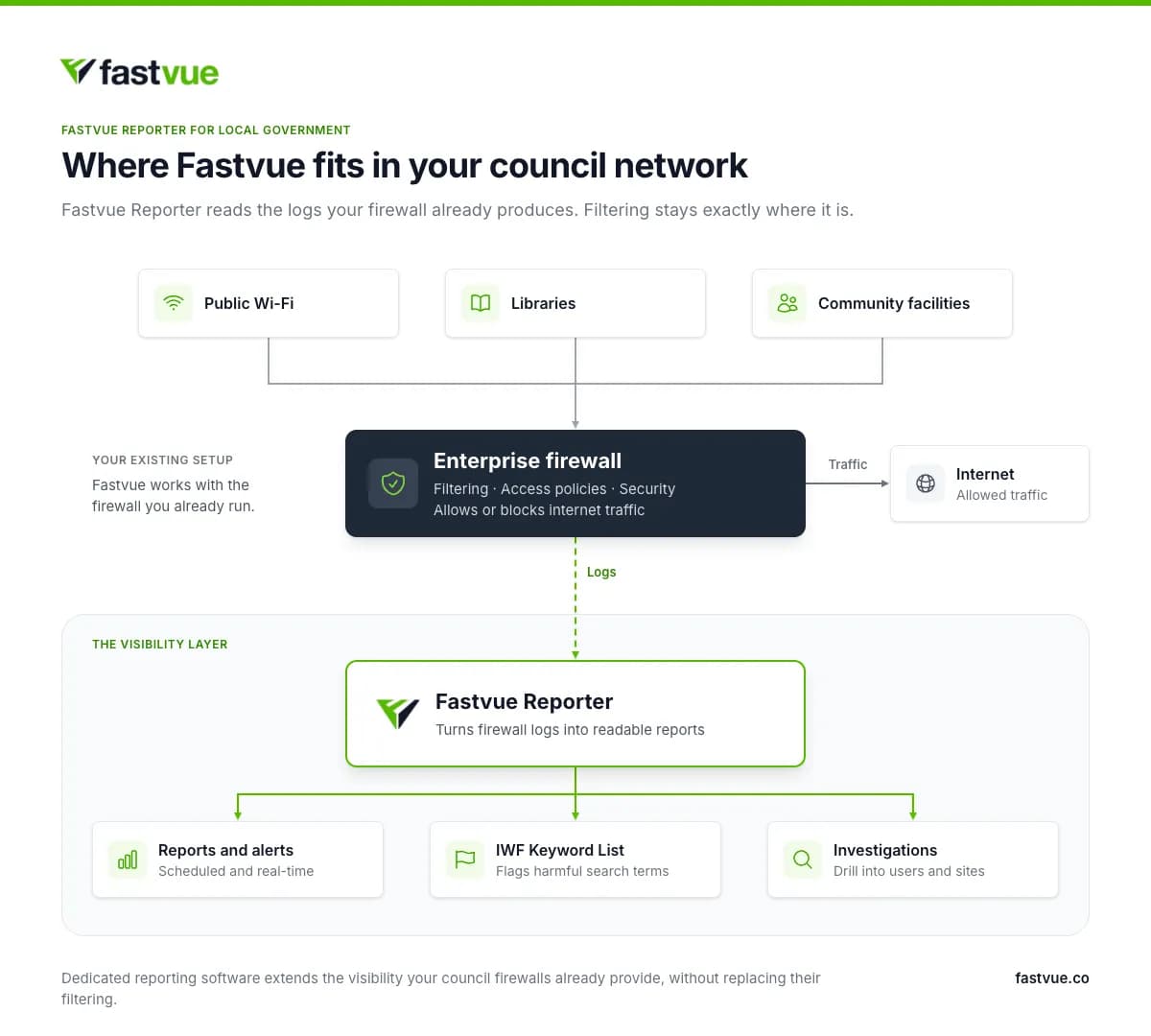
Dedicated reporting software extends the visibility provided by existing council firewalls without replacing their filtering functions.
Filtering software blocks access to prohibited websites and helps enforce restrictions established by your council.
Internet activity reporting software analyses network data to provide information about internet usage, security threats, and potentially harmful activity.
This distinction gives local authorities the flexibility to improve monitoring without automatically imposing additional restrictions on public internet access.
It also means that councils do not necessarily need to purchase an entirely new filtering platform to improve safeguarding visibility.
For more information on how these technologies work together, read our guide to public library internet monitoring and balancing access and security.
4. Assess data protection, privacy, and public trust
Your council's internet services might be used by a resident researching a sensitive medical condition, a young person seeking mental health support, or someone accessing domestic abuse resources.
Collecting detailed personal information about your user’s internet activity carries significant responsibilities.
Under the UK General Data Protection Regulation (UK GDPR) and Data Protection Act 2018, councils must ensure that the processing of personal data is lawful, transparent, and limited to what is necessary.
When choosing internet activity reporting software, involve your Data Protection Officer (DPO) early in the procurement process.
Data protection questions to ask software providers
Requirement | Question to ask |
Data minimisation | Which data fields does the software collect and store? |
Data ownership | Where is our reporting data stored and who controls it? |
Data retention | Can we configure how long activity records are retained? |
Access controls | Can we restrict access to detailed browsing and activity reports? |
Transparency | Can we accurately explain the monitoring process in our privacy notices? |
Third-party processing | Which external providers have access to our data? |
Auditability | What administrative activity and report access can be audited? |
Data deletion | How is information deleted from live systems, archives, and backups? |
International transfers | Is any personal data transferred outside the UK, and under what safeguards? |
The ICO's data minimisation guidance establishes that organisations should collect only the personal data needed for their defined purposes.
The ICO also requires organisations to conduct a Data Protection Impact Assessment (DPIA) where processing is likely to result in high risk to individuals.
Can councils monitor internet activity without tracking individual users?
Network-based reporting software can provide information about internet usage using network identifiers such as source IP addresses, devices, and subnets, without requiring every person to authenticate individually.
For example, your council might need to understand how much bandwidth public Wi-Fi users are consuming across six community centres.
You do not necessarily need to know the identities of individual users to answer that question.
More detailed activity reports can be reserved for appropriately authorised investigations.
However, IP addresses and other device identifiers can still constitute personal data. Reporting without a username should not automatically be considered anonymous monitoring.
5. Compare on-premises and cloud-based internet activity reporting software
Where does your council's firewall reporting data actually go?
It is a question your council can’t avoid asking, particularly when evaluating software that processes information about citizens' online activity.
Even if your enterprise firewall is installed on-premises, a cloud-hosted reporting platform may require you to transfer network logs to an external provider for processing and storage.
Depending on your firewall configuration, these logs could contain website URLs, search terms, usernames, IP addresses, and other information about individual users.
When evaluating internet activity reporting software, consider how the deployment model affects your council's control over this information.
Self-hosted vs cloud-hosted internet activity reporting
Where your firewall reporting software is hosted determines where residents' internet activity data is processed and stored, who manages the infrastructure, and how much direct control your council retains over that data.
Data protection consideration | Self-hosted reporting | Supplier-hosted reporting |
Where are firewall logs stored? | On infrastructure selected by the council. | On infrastructure managed by the supplier. |
Where is data processed? | Core reporting data is processed within the council's chosen hosting environment. | Data is transferred to the supplier's environment for processing. |
Who can access the data? | Access is managed directly by the council, subject to its hosting and support arrangements. | Access depends on supplier controls and contractual arrangements. |
How is data retention managed? | Through local software and storage settings. | Through platform capabilities and supplier policies. |
Are third-party processors involved? | Can reduce reliance on external data processors. | Requires assessment of the supplier and its subprocessors. |
Neither deployment model automatically guarantees compliance with UK GDPR.
However, councils with established server infrastructure and internal IT resources may find that self-hosted reporting allows them to manage data protection requirements more directly.
Fastvue Reporter can be installed on-premises or within your council's private cloud environment. Core firewall reporting data is stored within the selected deployment environment, while any additional connected services should be assessed separately.
This allows councils to extend the reporting capabilities of their existing firewalls without necessarily transferring their core internet activity logs to a SaaS reporting platform.
6. Look for reporting that works across multiple council sites
A local authority rarely manages just one public network.
Your council might operate internet services across:
- Public libraries.
- Community and youth centres.
- Leisure facilities.
- Council reception areas.
- Public Wi-Fi hotspots.
- Corporate offices.
Each location has different users, network requirements, and acceptable use policies.
When evaluating software, test its ability to distinguish between these environments using available firewall log fields, source subnets, IP ranges, and other network identifiers.
For example, your IT team should be able to generate a report showing bandwidth usage across public libraries without including internet activity from corporate council offices.
Similarly, safeguarding alerts relating to public networks should be directed to the appropriate people rather than distributed indiscriminately across the organisation.
What about corporate council networks?
Public internet monitoring and employee monitoring should be treated as distinct activities.
While the same firewall reporting platform may support both environments, councils must establish separate purposes, appropriate access controls, and transparent monitoring policies.
The ICO's guidance on monitoring workers provides specific information about employee monitoring responsibilities.
7. Test the accuracy and usefulness of internet activity reports
More data does not necessarily mean better visibility.
When a person visits a website, their browser may automatically connect to advertising platforms, content delivery networks, analytics services, and other third-party resources.
A basic firewall report might list every one of these connections as a separate website visit.
That can create a misleading picture of someone's internet activity.
For a council conducting a sensitive investigation, the distinction between a website someone intentionally visited and a background connection generated by that website is particularly important.
Fastvue Reporter's Site Clean technology processes firewall data to reduce irrelevant background traffic in reports, helping users understand which websites were actually browsed.
When comparing internet activity reporting solutions, ask suppliers to demonstrate the following report types.
Internet usage reports
Internet usage reports help you to quickly see how internet services are being used, identify bandwidth-intensive websites, review application usage, and report on individual locations to inform network capacity planning.
Safeguarding reports
Easily review potentially concerning internet activity, including searches and YouTube video titles matching keywords associated with extremism, self-harm, and other safeguarding concerns, as well as access or attempted access to inappropriate websites.
IT network and security reports
Review malware and other threats detected by your firewall, network connections, bandwidth consumption, application usage, VPN activity, and the firewall policies that allow or block traffic.
Detailed activity reports
Retrieve chronological browsing records, including URLs, timestamps, and whether access was allowed or blocked. Filter reports by available user identifiers, IP addresses, or subnets to support authorised investigations.
The level of detail available in these reports depends on your firewall's logging, traffic inspection, and user authentication configuration, as well as your data retention settings.
Understand the limitations of encrypted internet traffic
Reporting software can only analyse the information it receives.
With most internet traffic now encrypted using HTTPS, firewalls may have limited visibility into specific webpages, search terms, and other online activity unless deep packet inspection (DPI), also known as SSL/TLS decryption or HTTPS inspection, is enabled.
DPI is nto just important for producing detailed reporting, it’s also essential to ensure network security. DPI-SSL allows your firewall to inspect encrypted traffic for malware, malicious downloads, and other security threats that could otherwise go undetected. It also enables your firewall to log full URLs, providing greater visibility into internet activity.
However, councils need to consider how DPI is implemented across different network environments. While council-owned computers, including shared library computers, can be configured to trust the firewall's inspection certificate, this is more complicated when residents connect their own phones, laptops, and other personal devices to public Wi-Fi networks.
Firewall log information | Potential reporting visibility |
DNS requests | Requested domains |
Hostname information | Destination websites and services |
Full URLs | Specific webpages and URL query parameters |
Search terms | Search queries captured in firewall logs |
Application information | Identified applications and usage |
Security events | Threats and blocked connections detected by the firewall |
During a product demonstration, ask suppliers to use representative logs from your actual network infrastructure. Establish what visibility your existing firewall configuration provides and whether changes to inspection policies or logging settings are needed.
A reporting platform cannot recover search terms or detailed URLs that your firewall never recorded.
For further guidance, see our articles on optimising firewall logging for accurate reporting and implementing deep packet inspection without the headaches.
8. Evaluate real-time alerts and incident investigation capabilities
Your council should not have to wait until someone manually reviews an internet usage report to discover a potential security or safeguarding concern.
Real-time monitoring and automated alerts can help bring relevant activity to the attention of authorised personnel.
Depending on your firewall and logging configuration, internet activity reporting software can help flag:
- Potentially concerning searches identified through IWF keyword intelligence.
- Searches associated with extremism, radicalisation, or self-harm.
- Attempts to access prohibited websites.
- Malware and phishing events detected by the firewall.
- Connections associated with proxy or anonymising applications.
- Unusually high bandwidth consumption.
When evaluating alerting capabilities, consider how efficiently your council can investigate an incident once an alert is received.
Can your team locate the relevant device or network? Can they retrieve surrounding activity? Can they establish what information is available without exposing unrelated users' data?
The National Cyber Security Centre's guidance on logging for security purposes recommends designing logging strategies around the questions organisations need to answer during investigations.
It also emphasises the importance of accurate timestamps, appropriate logging configuration, and protecting access to log data.
9. Ask for evidence of experience working with UK councils
A supplier's ability to produce attractive dashboards is one thing. Its ability to support a council during a serious incident is another.
One UK council using Fastvue Reporter across its public library network has used internet activity reports to assist law enforcement with serious criminal investigations, including a case involving a missing child.
The ability to retrieve relevant historical activity from existing firewall data helped the council provide information when it was needed.
Rather than repeating the full case study here, you can read about the investigations and how the council used Fastvue in our UK council public library monitoring case study and public sector resources.
When evaluating suppliers, ask for evidence of deployments within comparable organisations.
Consider whether the provider understands the specific challenges associated with local government, shared public networks, limited authentication, safeguarding, and data protection.
Evaluate internet activity reporting software for your council
Use our procurement checklist to assess suppliers, identify gaps in reporting capabilities, and ensure your chosen solution meets your council's operational and regulatory requirements.
Button: Download your free checklist
Internet activity reporting built for UK councils
If your council already operates enterprise-grade firewalls, you may not need to invest in an entirely new filtering and monitoring platform to improve visibility across your public internet services.
Fastvue Reporter for Public Sector extends the capabilities of your existing firewall infrastructure, providing:
- Easy-to-read internet usage reports across council offices, libraries, and public Wi-Fi networks.
- Safeguarding reports and configurable real-time alerts.
- Internet Watch Foundation (IWF) Keyword List integration to identify searches potentially associated with child sexual abuse material (CSAM).
- Accurate website activity reporting using Fastvue's Site Clean technology.
- Detailed historical activity reports to support authorised investigations.
- Self-hosted deployment and configurable data retention, giving councils greater control over their reporting data.
Get more from the firewall you already trust
Talk to our team about how Fastvue Reporter can help your council improve network visibility, support safeguarding responsibilities, and maintain control over its firewall reporting data.
FAQs about internet activity reporting for UK councils
What is internet activity reporting software for UK councils?
Internet activity reporting software collects and analyses network data from firewalls and other supported security systems. It enables local authorities to understand internet usage, investigate security incidents, identify potential safeguarding concerns, and manage public network resources.
What is the best internet activity reporting software for UK councils?
The best solution will integrate with the council's existing firewalls, provide appropriate data protection controls, support safeguarding requirements, and deliver accessible reports and alerts. Fastvue Reporter is particularly suited to councils seeking self-hosted firewall reporting with IWF Keyword List integration.
Which internet monitoring software supports the IWF Keyword List?
Fastvue Reporter integrates the Internet Watch Foundation's Keyword List, which updates automatically to help identify searches and supported monitored communications potentially associated with child sexual abuse material.
Does Fastvue Reporter block harmful websites?
No. Fastvue Reporter analyses activity recorded by supported firewalls. The firewall or content filtering system remains responsible for enforcing internet access restrictions. Fastvue provides additional reporting, monitoring, and alerting capabilities.
How long should UK councils retain internet activity logs?
UK GDPR does not establish a universal retention period for internet activity logs. Councils must determine appropriate retention periods based on their processing purposes, applicable legal obligations, and documented retention policies.
Can UK councils monitor public Wi-Fi without installing software on users' devices?
Yes. Network-based reporting uses data collected by the council's firewall rather than requiring software to be installed on every connected device. Visibility depends on encryption, logging configuration, and available network information.
Can internet activity reports support Freedom of Information requests?
Internet activity reporting software can help councils locate relevant recorded information in response to information requests. However, disclosure is subject to applicable legislation, exemptions, and data protection requirements. Identifiable browsing histories should not automatically be disclosed in response to a Freedom of Information request.
Do councils need cloud-based internet monitoring software?
No. Councils can deploy dedicated reporting software on-premises or in their own private cloud environment. This can provide greater direct control over core reporting data while making use of existing network security infrastructure.
Do UK councils need separate internet filtering and monitoring software?
Not necessarily. Some products combine both capabilities. However, councils that already operate enterprise-grade firewalls can benefit from dedicated reporting software that extends the visibility of their existing infrastructure without requiring a replacement.