How to Detect Cyberbullying in Schools: A Practical Guide
Cyberbullying often goes unreported, making it difficult for schools to identify students at risk. Learn how to spot warning signs, uncover concerning online activity, and investigate potential incidents before they escalate.
 Bec May

Cyberbullying isn't always easy to spot. It happens in private messages, group chats, and online spaces that teachers and school staff never see. And students experiencing bullying are often too scared, upset, and isolated to say anything.
The Office for National Statistics research found that 18.1% of children aged 10-15 who experienced online bullying behaviour in England and Wales in the year ending March 2023 told nobody.
That leaves schools somewhat in the dark. Changes in behaviour, concerns raised by classmates, or fragments of online activity may shed some light on why a student may be withdrawing, but without a way to connect these warnings, cyberbullying often continues unchecked.
The clues are often there. It's a matter of bringing them to light. By combining staff observations, student reporting, and digital safety monitoring, schools can build a clearer picture of what's happening, identify cyberbullying earlier, and step in before the situation escalates.
This guide and checklist is designed for UK school leaders to provide a clear roadmap for monitoring, identifying, and dealing with cyberbullying in their school environment.
Could your school spot cyberbullying before a student speaks up?
Download our free Cyberbullying Detection Checklist for Schools to help your team recognise warning signs, uncover potential concerns, and make sure students know where to turn for support.
What are the warning signs of cyberbullying?
When a young person is being bullied online, the effects don't stay neatly in the digital world.
Cyberbullying can, and does, severely affect children's mental health, self-esteem, friendships, and academic performance. Anxiety, low confidence, and social withdrawal may become apparent long before anyone reports the abusive messages or harassment behind them.
And the tactics aren't getting any easier to spot. From anonymous messages and fake accounts to AI-generated abuse, cyberbullying is constantly changing. Our 2026 guide to cyberbullying in schools looks at how students are being targeted and the emerging behaviours teachers need to understand.
According to the NSPCC, there are several signs that a child may be experiencing bullying.
1. Behavioral and emotional changes
Signs that school staff should watch for include:
- Becoming withdrawn from friends, family, or classroom activities
- Appearing anxious, upset, or angry after using a phone or computer
- Changes in mood, appetite, or sleeping patterns
- Losing confidence or showing signs of low self-esteem
- Becoming reluctant to attend school or particular lessons
- A sudden decline in academic performance
These changes could indicate cyberbullying, but they may also point to other mental health or safeguarding concerns. You should approach the student sensitively rather than assume bullying is taking place.
2. Changes in friendships and peer relationships
Cyberbullying often involves people who know each other in real life.
You may notice a student being excluded from their usual friendship group, avoiding certain classmates, or becoming visibly distressed or hesitant to take part in group activities.
Other students may appear to be sharing jokes at the person's expense, exchanging messages when that student enters or leaves the classroom, or acting differently towards them.
Monitoring and recording these social changes can help you identify patterns of exclusion or harassment that might otherwise go unnoticed.
3. Changes in how students use technology
A child experiencing cyberbullying may become unusually nervous and agitated when their phone receives a notification; they may stop using gaming platforms or chat rooms they used to love; they may become secretive about their online activities.
Some students avoid devices altogether. Others repeatedly check their messages because they're so anxious about what might be posted next.
None of these indicators prove cyberbullying is happening. But a sudden change in a student's relationship with technology can be a reason to start a supportive conversation.
How can schools detect cyberbullying before it is reported?
Detecting cyberbullying early requires several strategies working together. Schools cannot rely entirely on technology, and they cannot expect every child to disclose what's happening.
1. Encourage confidential reporting
One of the first steps is making sure students know who they can talk to and what will happen when they report a concern.
- Schools should provide confidential support through trusted teachers, pastoral staff, or their designated safeguarding lead (DSL). Anonymous reporting systems can also help young people who are worried about retaliation or embarrassment.
- Encourage students to report harmful messages they receive or witness, even when they are not the targeted individual.
- Bring parents into the loop. Open communication between home and school can uncover concerns that, when pieced together, reveal a pattern of bullying that neither might have recognised on their own.
Of course, giving students somewhere to report a concern is only part of the picture. Someone also needs to record it, assess it, and make sure it reaches the right person. Our guide to safeguarding software for schools explains how reporting, monitoring, and incident management systems work together.
2. Bring together observations from the school community
Your Form 9 tutor notices a student withdrawing from friends. The student's parent reports that their child has been upset after reading messages on their phone. The year nine teaching assistant mentions that the teen's classmates have been excluding the student in an assigned group task.
Individually, these observations may not seem particularly serious. Together, they start to look a lot like signs of bullying.
Schools should train staff on how to record concerns and share relevant information with the DSL through established safeguarding procedures.
A central record of cyberbullying incidents helps to identify repeated inappropriate behaviour, previous complaints or patterns of harassment involving the same students.
3. Use digital monitoring to identify concerning online activity
Schools are also able to detect potential cyberbullying signals through online activity that occurs on school networks, devices and communication platforms.
Depending on the monitoring tool your school is using, your team may be able to identify:
- Concerning web searches about bullying, threats, harassment or self-harm
- Abusive or threatening communications in school email and chat communications
- Keyword-matched activity that raises safeguarding concerns
- Repeated searches about how to deal with online threats or harassment, or a pattern of abusive messages directed at the same student through school email or chat platforms.
Automated monitoring solutions can flag predefined keywords or use AI-assisted analysis to help assess potentially harmful content.
No monitoring system sees everything. Private messages, personal devices, and activity outside your school's monitored platforms can leave gaps. That's why digital monitoring needs to work alongside staff observations and student reporting.
How Fastvue helps schools identify potential cyberbullying
Picture your DSL's inbox on a Monday morning. Hundreds of alerts from your school's existing monitoring software. Everything from content delivery networks and harmless keyword matches to potentially serious safeguarding concerns. Somewhere in that noise, there might be a student who needs help.
Alert fatigue is setting in, and your DSL is spending more time sorting through false positives than investigating genuine concerns.
Making matters worse, there's little visibility into what's happening inside school email and chat platforms. When a student reports being bullied online, the investigation often relies on fragmented screenshots, second-hand accounts, and conversations with teenagers who aren't always willing to explain what's really going on.
Enter Fastvue Reporter with FAIM.
With web activity, supported email and chat communications, and AI-powered risk assessment brought together in Fastvue Reporter, your DSL has a much clearer starting point.
Here's how their daily workflow changes.
Step 1: Start with a prioritised Safeguarding Report
Every morning, your DSL receives a scheduled Safeguarding Report covering Year 9 students.
Instead of opening dozens of disconnected alerts, they can review keyword-matched activity organised into safeguarding categories, with FAIM's AI Risk Assessment helping prioritise incidents by severity.
This morning, a student's activity stands out.
They've repeatedly searched for advice about threatening messages and being harassed online. Several keyword-matched messages in a supported school Teams conversation have also been flagged for review.
The student hasn't reported being bullied.
Previously, those searches might have been buried among hundreds of alerts, while the Teams messages remained outside the school's monitoring visibility.
Now, your DSL has a reason to look closer.
Step 2: Investigate the activity in context
A keyword match alone doesn't tell your DSL whether a student is experiencing bullying, researching a topic, or simply having an argument with a friend.
With Fastvue Reporter v4.5 and FAIM, safeguarding incidents are prioritised by AI-assessed risk, from Severe to Mild. Your DSL can see the student's searches, YouTube videos (including how long they watched), emails, Teams messages, and web activity in a single timeline.
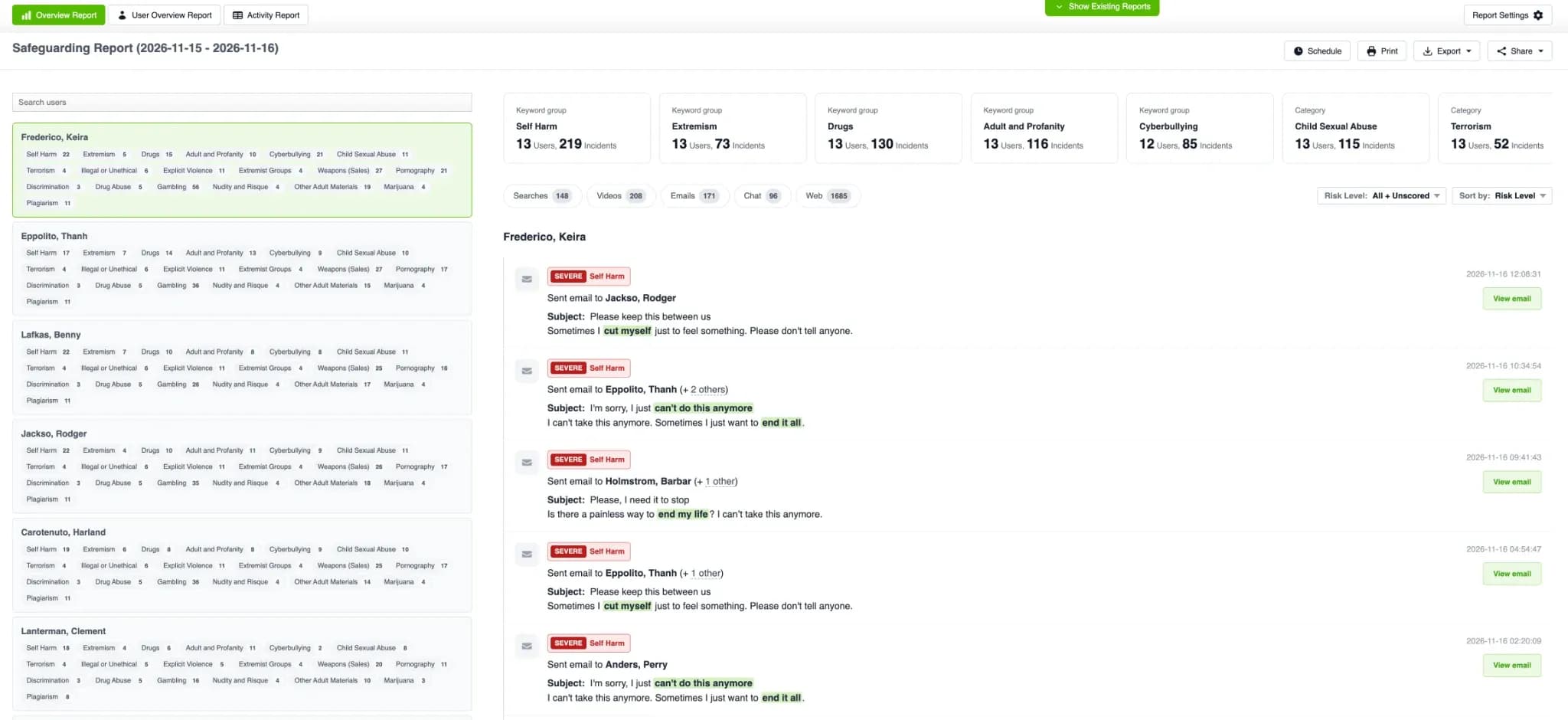
One click opens the full email, video, or conversation, so your DSL can read the messages before and after a flagged incident rather than relying on an isolated snippet.
If they need to dig deeper, the Internet Usage and Activity Reports provide additional detail about the student's online activity.
What started as a concerning search now has context. Your DSL can see whether other monitored activity supports the concern and decide what needs investigating further.
Step 3: Connect the digital evidence with what's happening at school
Your DSL now has a clearer picture of what's been happening online. But what about in the classroom?
They speak with the student's Year 9 form tutor, who mentions the student has stopped sitting with their usual friends. A teaching assistant has noticed classmates deliberately excluding them from group activities, and a parent recently contacted the school because their child was getting upset after reading messages on their phone.
Suddenly, the pieces start falling into place.
What looked like a few unrelated incidents now suggests a possible pattern of bullying. Your DSL has digital evidence to consider alongside observations from staff and parents, giving them a stronger basis for a sensitive conversation with the student.
As our APAC GM always says, it's about having the right conversation with the right student at the right time.
Not, "Hi Little Johnny, we heard there might be some bullying going on, and your name came up in a report. Something about a YouTube video? We're not entirely sure..."
A little awkward for everyone.
The more context your DSL has before that conversation, the better chance they have of asking the right questions, understanding what's really happening, and getting the student the support they need.
Step 4: Take action and follow up
Armed with a clearer picture, your DSL can approach the student sensitively, ask what's been happening, and work out what support they need.
If the investigation confirms cyberbullying, the school follows its safeguarding and anti-bullying procedures, records the incident, and takes appropriate action.
But the job doesn't end there.
Your DSL arranges a follow-up conversation to check that the bullying has stopped, the student feels safe, and there haven't been further incidents or retaliation.
Fastvue hasn't made the safeguarding decision. It's helped bring concerning activity to light, put it into context, and given your DSL the information they need to act.
Less time chasing false positives and piecing together screenshots. More time having the right conversations with the students who need them.
Note: Schools can also configure alerts for supported cyberbullying-related activity, helping safeguarding staff respond to concerning signals without waiting for the next scheduled report.
How confident are you that your school would spot the warning signs?
Put your safeguarding processes to the test with our free Cyberbullying Detection Checklist for Schools. From breaking the silence to investigating concerns and following up, it's a practical resource for teachers, pastoral staff, and DSLs.
[Download your free checklist]
Detecting cyberbullying starts with connecting the dots
A student withdrawing from friends, an unusual online search, or a concern raised by a parent might not tell the whole story.
But when schools can bring these pieces of information together, they are better placed to recognise potential cyberbullying and intervene before harm escalates.
By combining staff awareness, confidential reporting via safeguarding software, and digital monitoring, schools can identify concerns that might otherwise go unnoticed.
Fastvue Reporter for Education helps safeguarding teams investigate concerning online activity through readable reports, supported email and chat monitoring, and optional AI-powered risk assessment.
Frequently Asked Questions
How can teachers tell if a student is being cyberbullied?
Teachers may notice withdrawal from friends, anxiety around digital devices, changes in behaviour, or a decline in academic performance. These signs don't necessarily mean a student is being bullied online, but they can justify a supportive conversation and referral to the designated safeguarding lead when appropriate.
Can schools detect cyberbullying through monitoring software?
Yes. Monitoring software can identify potentially concerning web searches, keyword-matched activity, and abusive or threatening language in supported communications. Coverage depends on the technology used, and alerts require human review before conclusions are drawn.
Can AI tools detect cyberbullying?
AI-assisted monitoring can help assess selected online activity for potentially concerning language and context. However, AI cannot identify every instance of cyberbullying, particularly when activity occurs on unsupported platforms or uses subtle language. Safeguarding professionals or your well should assess findings.
What evidence should schools collect when investigating cyberbullying?
Relevant evidence may include reports from students or parents, messages, screenshots, usernames, dates, school safeguarding records, and available digital monitoring reports. Schools should collect only what is necessary, protect personal details, and handle sensitive material in line with safeguarding and data protection procedures.